Website Launch DNS Monitoring: How an AI Agent Watched a Cloudflare DNS Switch Every 5 Minutes and Reported Each Step in Slack
Launch day for a new website comes down to a few DNS changes, and in this case the client was making them, on their own schedule. Instead of people refreshing a browser all afternoon, an AI agent checked every five minutes, looked but never touched, and posted in Slack the moment each step landed or something looked wrong.
What was getting in the way.
Moving a live website to a new home means changing DNS, the internet's address book for a domain. When the client's own IT contact makes those changes, the team that built the site is left guessing: has it started, did the right record change, is the secure certificate ready, is the site actually up? The usual answer is someone refreshing a page and running lookups by hand for hours. Mistakes in this window are expensive, because the site and sometimes email are down while they are sorted out.
Context
A business moving its website to a new platform, with its own IT contact in control of DNS and Cloudflare. Our team built the site and did not have, or need, a Cloudflare specialist. The pattern fits any launch where someone else holds the keys: you can still know exactly what is happening.
How the work runs.
- 01
Turn the plan into a checklist a script can read.
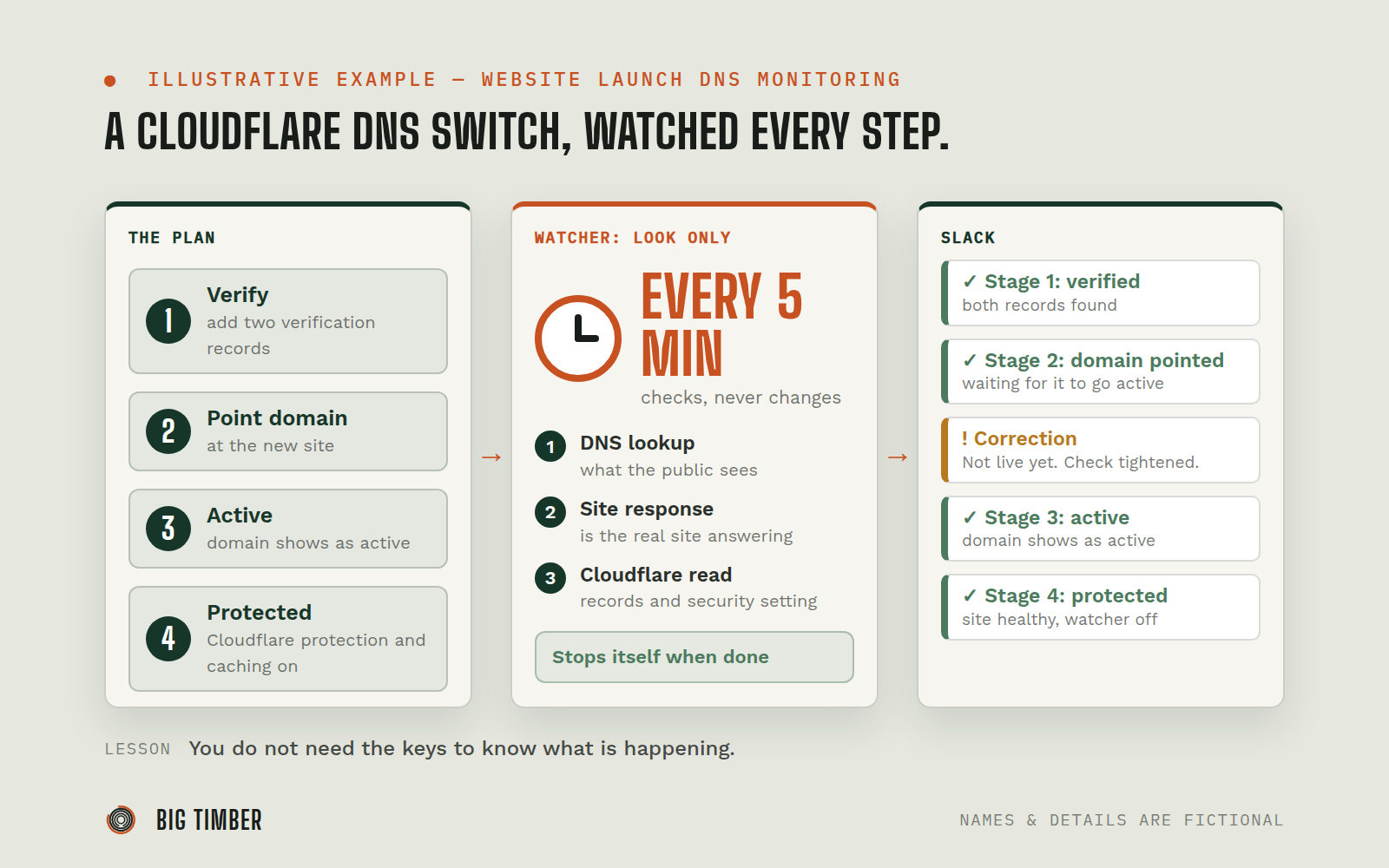
The hosting platform's support team had given four stages: add two verification records, point the domain at the new site, wait for the domain to show as active, then turn on Cloudflare's protection and caching.
- 02
Set a watcher that only looks.
Every five minutes it ran public DNS lookups, fetched the site's response headers, and read the relevant records and security setting from Cloudflare. Read requests only. Nothing was ever written to Cloudflare, the platform, or DNS.
- 03
Speak only when something changes.
The watcher posted once per milestone in the team's Slack channel, tagged the launch lead, and included a short ready-to-send line for the client. Between milestones it stayed silent.
- 04
Catch the awkward middle.
After the client pointed the domain at the new site, the address answered with a "project not found" page. The agent explained it as the expected gap before the platform activates the domain, and posted the rollback values in case it lasted.
- 05
Correct its own mistake in public.
One early check reported "serving from the new site" when the response was actually an error page. The health check had been too lenient. The agent tightened it within two minutes and posted a correction so nobody sent the client a premature "you're live."
- 06
Flag what did not match the plan.
The watcher noticed the security mode was set differently from what support had specified and raised it for the humans to resolve.
- 07
Switch itself off.
Once the final stage was confirmed with a healthy site, the watcher stopped. It was also set to expire after 48 hours no matter what.
Evidence from the workflow.
Each system has a role.
the client's DNS and protection layer, read through its API with view-only requests
Cloudflare
independent confirmation of what the outside world sees
Public DNS lookups and website header checks
runs the scheduled watcher as a plain script, with no AI model call per check
OpenClaw
where each milestone and warning was posted
Slack
Why this is Operator.
Owns a workflow end to end, running the process inside the authority you set.
- 01
Read-only by design. The watcher could not change a DNS record, a Cloudflare setting, or the website, and it never contacted the client. Every message to the client went through a person. The watcher had a built-in end: done at the last milestone or after 48 hours.
Impact / Outcomes
All four stages were detected and reported within one five-minute cycle of the client making each change.
The whole switch took about half an hour, and the team knew the state of it at every point without anyone checking by hand.
One wrong status message was caught and corrected in two minutes, before it reached the client.
A mismatch between the plan and the live security setting was surfaced the same afternoon.
Routine checks cost nothing in AI usage, because the watcher is a script that only wakes the agent's judgment when something changes.
Find where a workflow like this fits.
Start with the systems, work, constraints, and authority already present in your operation.