What is OpenClaw, and how does it compare to the other ways businesses deploy AI?
If you have heard the name OpenClaw and are not sure what it actually is, this page is for you. No background assumed, no hype. We will define it in plain English, put it next to the other ways businesses are deploying AI today, and tell you honestly where each approach wins, where each one breaks, and when OpenClaw is the wrong choice.
A disclosure before anything else: Big Timber implements and manages OpenClaw for clients. We are not neutral, and we will not pretend to be. We are opinionated because we evaluated the field and picked a side. But this page only works if it is honest, so the comparison below includes the cases where you should pick something else, including the case where you should pick nothing yet.
What OpenClaw is, in plain English
OpenClaw is an open-source platform for running AI agents inside a business. An agent, in this context, is not a chatbot. It is a worker: software that can read a message, look things up in your real systems, do multi-step work, and report back.
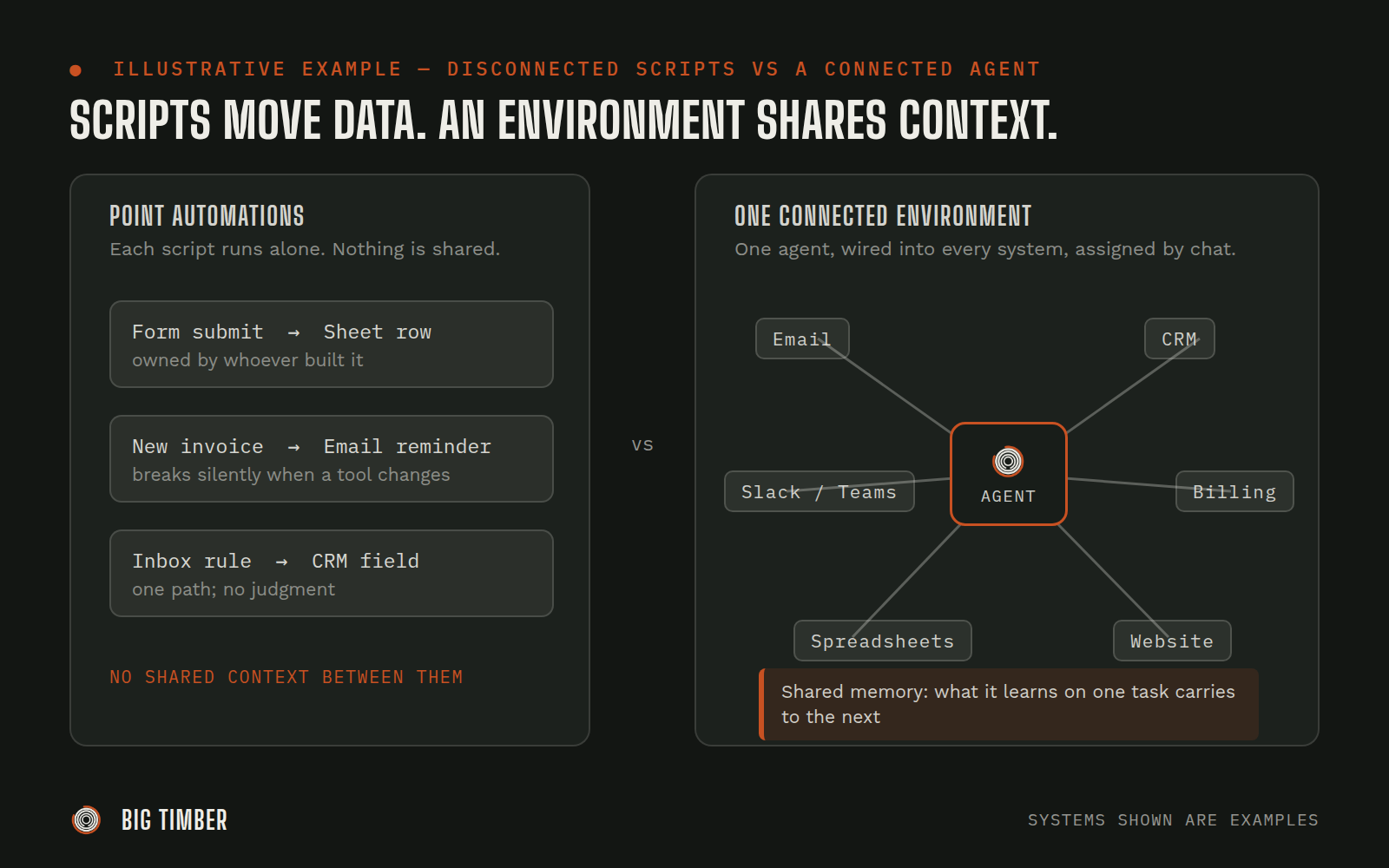
The part that makes OpenClaw different from most of what gets sold as "AI for business" is the word connected. An OpenClaw agent does not live in its own browser tab waiting for someone to visit it. It lives where your team already works, in Slack or Microsoft Teams, and it is wired into the systems your business already runs on: your email, your CRM, your spreadsheets, your billing, your website. You assign it work the way you would assign work to a colleague: by sending a message.
Three properties define the connected agent model:
- It works in your tools, not next to them. The agent reads and acts on your actual systems. It does not produce advice for a human to carry out; it carries the work out, with human approval wherever consequences matter.
- It holds context over time. It remembers how your business does things, what happened last week, and what it learned the hard way. Each task makes the next one cheaper.
- It runs on infrastructure you own. OpenClaw is open source. It runs on your own server (or one your implementation partner manages for you), which means no per-seat pricing, no vendor sitting between you and your data, and no ceiling on what can be wired into it.
That is the model. Now the honest part: the comparison.
The five ways businesses deploy AI today
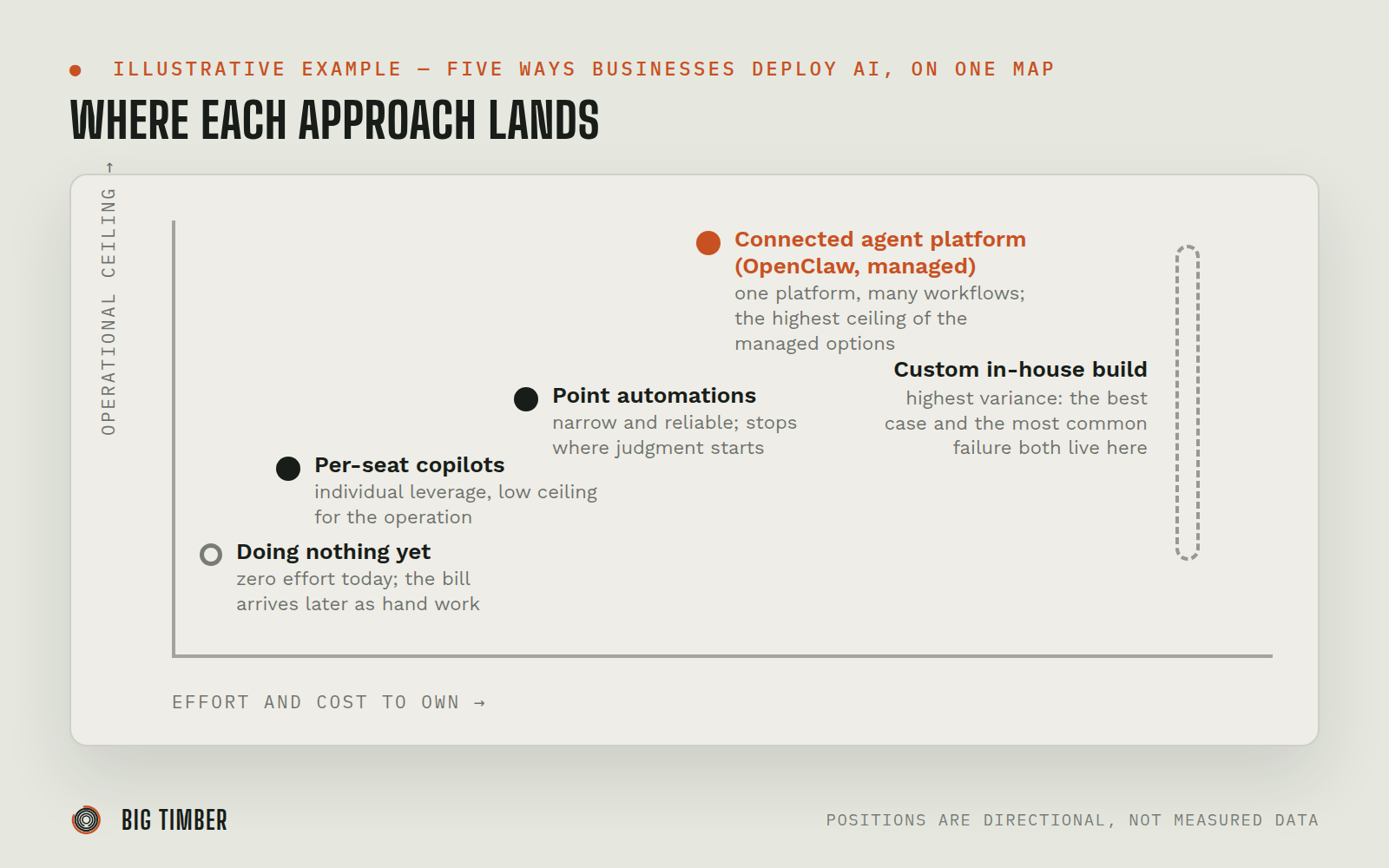
Nearly every AI deployment we see falls into one of five approaches. Each one is the right answer for somebody.
1. Per-seat copilots and chat subscriptions
What it is. ChatGPT, Claude, or Copilot licenses handed out to the team. Everyone gets a seat and a chat window.
Where it shines. Individual productivity. Drafting, summarizing, thinking out loud, first passes at analysis. For a knowledge worker who builds the habit, a seat pays for itself quickly. It is also the cheapest and fastest way to get started: buy licenses, send a memo, done.
Where it breaks. The seats help individuals, not the operation. The AI cannot see your CRM, your inbox, or your order history, so every task starts with a human copying context in and ends with a human copying results out. Usage also decays: a few enthusiasts keep using their seats, and the rest quietly stop. Nothing about the business itself has changed; the work still moves through the same hands at the same speed.
Cost and effort profile. Low cost per month, near-zero setup effort, and a low ceiling. You are buying individual leverage, not operational capacity.
2. Point automations (Zapier-style)
What it is. Trigger-action tools like Zapier or Make, sometimes with an AI step in the middle. When a form is submitted, add a row to a sheet and send an email.
Where it shines. Narrow, stable, high-volume handoffs between two or three systems. If the same five fields need to move from one tool to another every time, a point automation is cheap, reliable, and the correct choice. Plenty of businesses should have more of these, not fewer.
Where it breaks. Judgment. Point automations follow one path. The moment a task requires reading a situation and deciding what to do (an angry customer email versus a routine one, an order that is weird versus one that is normal), the automation either cannot handle it or mishandles it quietly. These stacks also grow brittle: dozens of zaps, each owned by whoever built it, each breaking silently when an upstream tool changes.
Cost and effort profile. Low cost per automation, moderate maintenance effort that grows with the stack, and a hard ceiling at tasks that require judgment.
3. Custom agent builds and in-house development
What it is. Hiring developers (or an AI dev shop) to build agents from scratch on raw model APIs, frameworks, and glue code.
Where it shines. Total control. If your needs are genuinely unusual, your scale is large, and you have engineering leadership who will own the system for years, a custom build can fit your business like nothing off a shelf will. Companies with real software teams and a differentiated process sometimes should build.
Where it breaks. Everything that is not the demo. The prototype takes weeks; the production system takes quarters. Memory, permissions, cost controls, monitoring, failure handling, and keeping up with a model landscape that shifts under your feet are all your problem forever. When the engineer who built it leaves, the system often leaves with them. Most mid-sized businesses that start down this road end up with an expensive internal project and no agent in production.
Cost and effort profile. High cost, high effort, long timeline, and the highest variance of any option here: the best possible outcome and the most common failure mode both live in this category.
4. A managed connected-agent platform (OpenClaw)
What it is. The model described above: open-source agent infrastructure on a server you own, wired into your systems, operated through Slack or Microsoft Teams, typically stood up and managed by an implementation partner rather than built from scratch.
Where it shines. Cross-system work that requires judgment and repeats. The inbox that needs triage every day. The report that requires pulling from three systems. The follow-up that always slips. One platform carries many workflows, the agent accumulates knowledge of your business over time, and new capabilities get added by asking rather than by starting a new project. Because the platform is open source, there is no integration catalog to outgrow: if your business runs on something unusual, it can still be wired in.
Where it breaks. It is infrastructure, and infrastructure is never free to own. There are real early decisions (hosting, access, permissions, spend controls) where wrong calls get expensive, which is why most businesses bring in help rather than standing it up solo. It needs an internal owner who cares. And it is overkill for a business whose entire AI need is one narrow workflow or personal drafting help.
Cost and effort profile. Meaningful upfront investment and a real ongoing operating cost (model usage plus hosting), in exchange for the highest ceiling of the managed options. The economics favor businesses with enough cross-system work to load the platform up; they do not favor businesses with one small job to automate.
5. Doing nothing yet
What it is. Watching, reading, and waiting for the field to settle.
Where it shines. This is underrated. If your operation is small and smooth, if nobody internally is pulling for this, or if your constraint right now is something AI does not fix (demand, hiring, cash), waiting costs you little. The tools will be better and cheaper next time you look, and the implementation lessons will be better documented. A deliberate "not yet" beats a half-committed deployment that sours the team.
Where it breaks. When waiting is a decision nobody actually made. The cost of doing nothing is not falling behind on technology; it is the compounding of work your team does by hand while competitors quietly stop doing it by hand. If your people are already drowning in cross-system busywork, "later" has a price that grows every quarter.
Cost and effort profile. Zero cost today, zero effort today, and a bill that arrives as overtime, missed follow-ups, and hiring you might not have needed.
When OpenClaw is the wrong choice
We said this page would be honest, so here is the list we walk through with prospects before taking their money:
- Regulated or highly sensitive data constraints. If your data handling is governed by strict regulatory regimes and your compliance team has not approved AI systems touching production data, settle that question first. Self-hosting helps the conversation, but it does not replace it.
- No internal owner. A connected agent platform needs at least one person inside the business who cares about it, feeds it, and notices when something is off. If nobody on your team will own it, the deployment will decay no matter who implements it. Fix the ownership question before the tooling question.
- A single, stable workflow. If your whole need is "when X happens, do Y," buy the point automation. It will be cheaper, simpler, and just as reliable. Platforms earn their keep across many workflows, not one.
- Very small or very simple operations. A handful of people, work that lives in one or two tools, no real cross-system friction: a couple of copilot seats will serve you better than infrastructure. Come back when the operation outgrows them.
- You want a vendor, not a capability. Some teams want a packaged SaaS with a support line and nothing to own. That is a legitimate preference, and there are good products built for it. OpenClaw is for businesses that want to own their AI capability the way they own their other infrastructure.
If you are already past the "which product" stage and comparing OpenClaw against specific agent platforms by name, we wrote a separate head-to-head: Which Tool Sinks in Deepest? OpenClaw vs. the AI Agent Field.
A decision checklist
Answer these honestly and the right approach usually falls out:
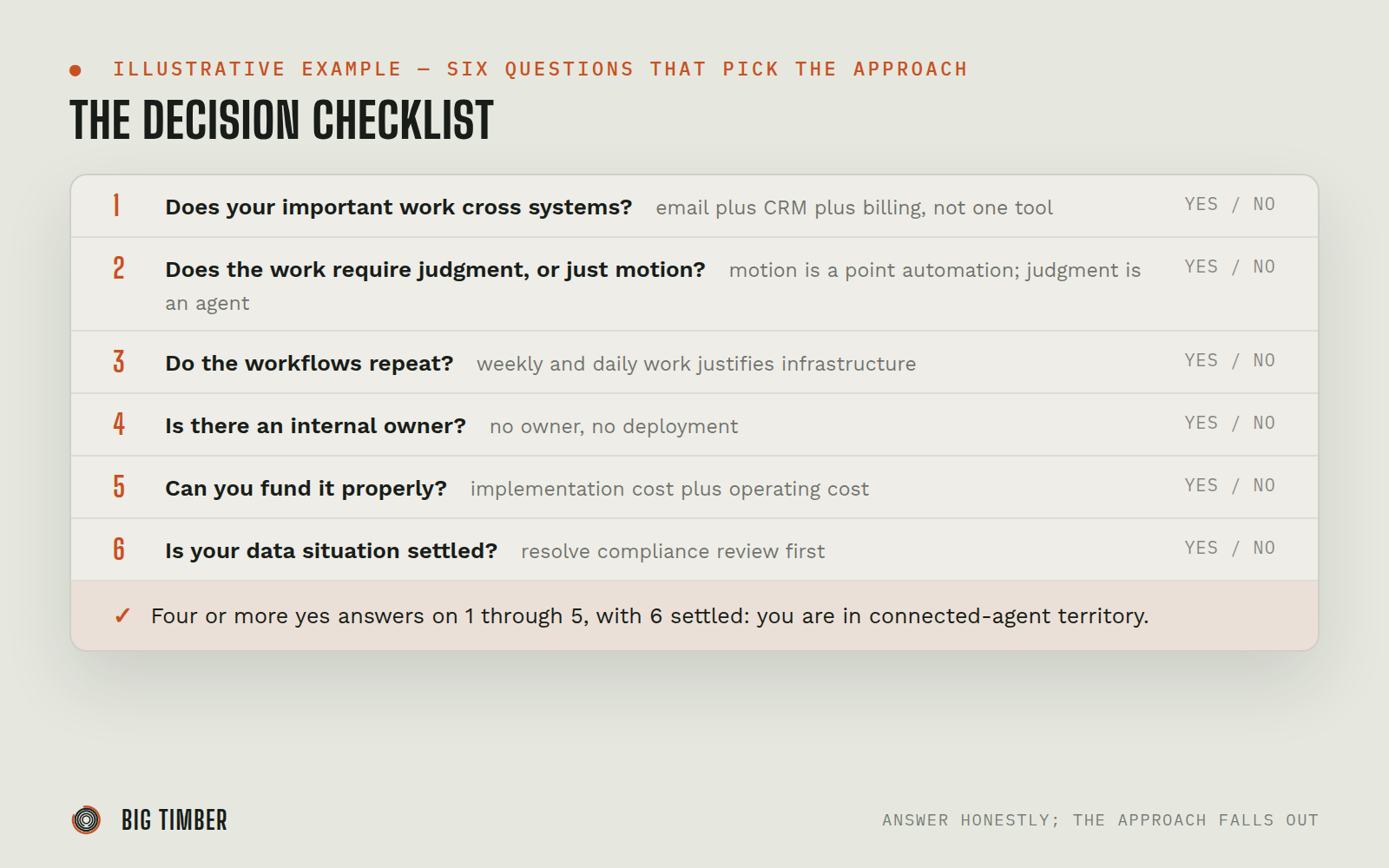
- Does your important work cross systems? If a typical task touches email plus CRM plus a spreadsheet plus a billing tool, you are in connected-agent territory. If it lives in one tool, you are not.
- Does the work require judgment, or just motion? Motion between systems is a point automation. Judgment plus motion is an agent.
- Do the workflows repeat? One-off projects do not justify infrastructure. Weekly and daily work does.
- Is there an internal owner? Someone who will meet with the implementation partner, correct the agent when it is wrong, and champion it internally. No owner, no deployment.
- Can you fund it properly? A real deployment has an implementation cost and an operating cost. If the budget only covers a gesture, buy copilot seats instead and revisit later.
- Is your data situation settled? If compliance review is unresolved, resolve it first. Infrastructure decisions made before that conversation tend to get remade after it.
Four or more "yes" answers on 1 through 5, with 6 settled: the connected agent model is probably your answer, and OpenClaw is the platform we would deploy it on. Fewer than that: one of the other four approaches above is likely the better buy, and we will tell you which one.
Related reading
- Which Tool Sinks in Deepest? OpenClaw vs. the 2026 AI Agent Field for Real SMBs: the product-level head-to-head, for readers already comparing OpenClaw against named platforms.
- Copilot vs. Coworker vs. Operator: The Three Levels of AI Autonomy: a shared vocabulary for how much autonomy the agent gets, and the ladder workflows climb.
- AI Agent Permissions: Why a Label Isn't a Wall: how access boundaries actually work once an agent is wired into real systems.
- AI Agent Memory: Your AI Is a Tamagotchi, Not a Brain: what "holds context over time" really means in practice, and how an agent gets taught.
- Why Most AI Implementation Plans Fail (and What a Real One Looks Like): what the deployment plan looks like once you have picked the connected agent model.