One Slack Message → A Fully Built, Assigned Task
Turn a single plain-English Slack message into a complete, correctly routed, correctly assigned task in ClickUp — with the AI agent doing all of the research and write-up a good project manager would.
What was getting in the way.
Task assignment stalls because writing a good ticket is real work. Someone has to gather the background, dig up the client notes, find the prior conversations, decide who owns it and by when — so requests sit in chat waiting for a human to "write it up properly," and details quietly fall through the cracks between the conversation and the project management system.
Context
A client-services team managing work across many client accounts, where requests originate in fast-moving Slack channels.
How the work runs.
- 01
Someone just says it
A team member types one sentence in Slack: 'we need the hours updated on this client's site' or 'get a proof of the new offer over to them.' No form, no fields, no template.
- 02
The agent does the digging
Before anything is created, the agent gathers the context a human would have to hunt for: the client's account notes, recent Slack discussion about them, prior related tasks, and relevant site or campaign details. This is the heavy lifting — minutes of cross-referencing done automatically.
- 03
It writes a real ticket
The agent drafts the task the way a strong PM would: clear title, full description with the gathered background, links to the source conversation, concrete acceptance criteria, and a sensible priority and due date.
- 04
Files it in the right place, assigns the right person
The task lands in the correct client's space and list in ClickUp, assigned to the teammate who owns that kind of work, with status set.
- 05
Reports back with the link
The agent replies in the Slack thread with the finished task. If anything needs adjusting, a one-line reply fixes it.
Evidence from the workflow.
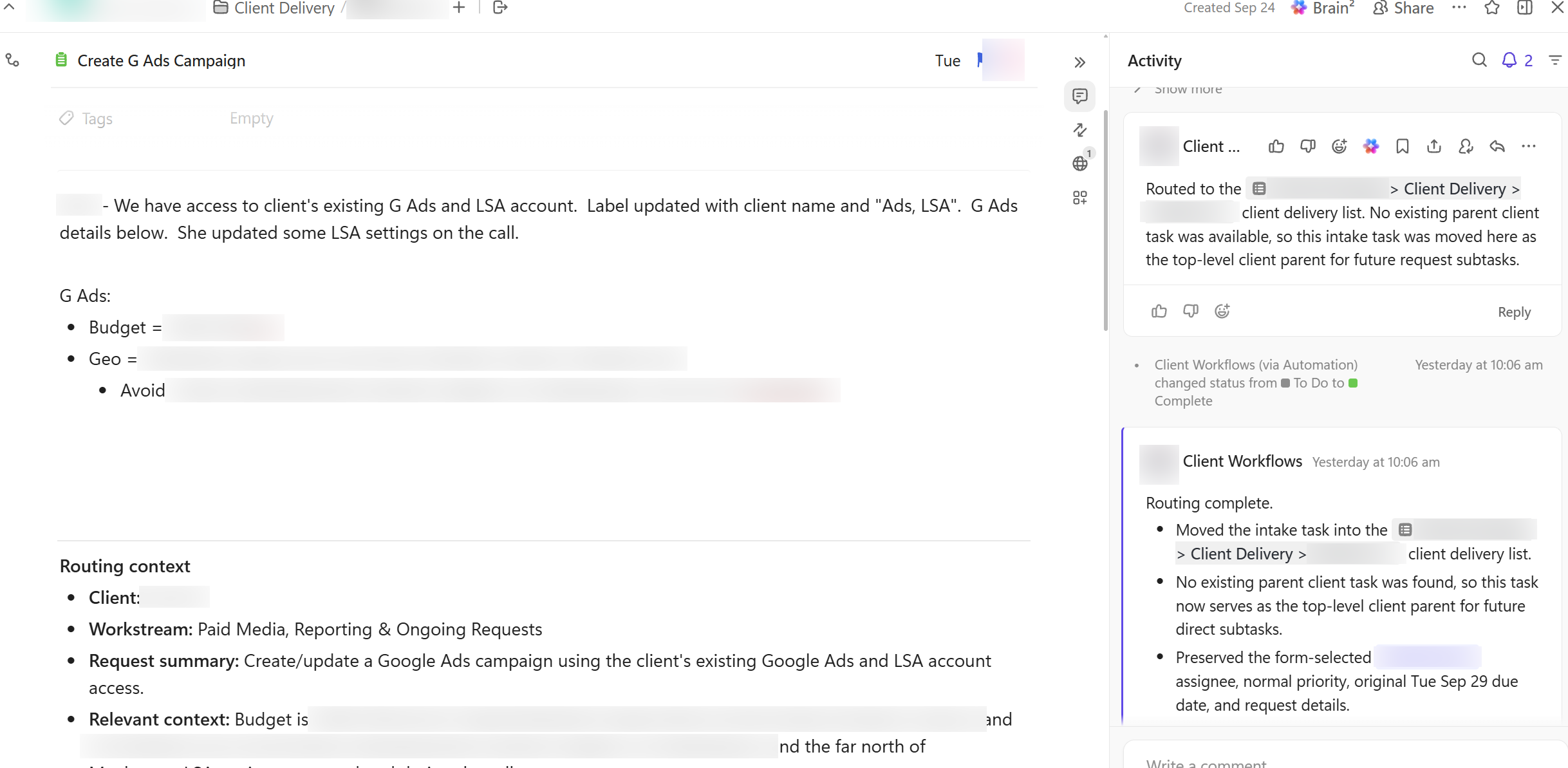
Each system has a role.
intake + confirmation
Slack
task creation, routing, assignment
ClickUp
account notes and history the agent reads for context
Internal client knowledge base
Why this is Coworker.
Takes assignments and reports back. You hand it work, it prepares and returns a result.
- 01
The agent creates and assigns tasks; humans stay in control — any task can be reassigned, edited, or closed by the team, and every task links back to its originating Slack thread for a full audit trail. The agent never deletes tasks or changes scope on its own.
Impact / Outcomes
A one-sentence message becomes a complete, assigned ticket in minutes — not whenever someone finds time to write it up
Assignees open tasks that already contain the background, links, and acceptance criteria they need to start immediately
Nothing gets lost between the conversation and the project management system — every task traces back to its source thread
The team delegates at the speed of a Slack message; the AI absorbs the administrative overhead of good task hygiene
Find where a workflow like this fits.
Start with the systems, work, constraints, and authority already present in your operation.