Build a Google Ads Search Campaign With an AI Agent: Ad Groups, RSAs, and Negative Keywords Shipped Paused and Verified by API Read-Back
A full Google Ads search campaign, four ad groups with keywords and responsive search ads, geo and network settings, and 29 negative keywords, built through the API in one pass. It shipped paused, and the agent proved every setting with an independent read-back before anyone touched a budget.
What was getting in the way.
Building a search campaign by hand in the Google Ads interface is an hour of clicking through a wizard that is actively trying to upsell you: display expansion on by default, search partners on by default, broad targeting nudges at every step. Miss one toggle and the budget leaks into placements nobody asked for. Agencies that build many accounts repeat this error-prone ritual each time, and the person doing the clicking rarely re-opens every settings page afterward to confirm what actually saved. The expensive failure mode is not a missing campaign, it is a live campaign with one wrong default quietly spending.
Context
A marketing agency that builds search campaigns both for its own services and for client accounts. The pattern applies to anyone who stands up Google Ads campaigns more than once: the structure changes per account, but the leak-prone defaults and the need to verify stored settings are the same every time.
How the work runs.
- 01
Take the build spec in plain language.
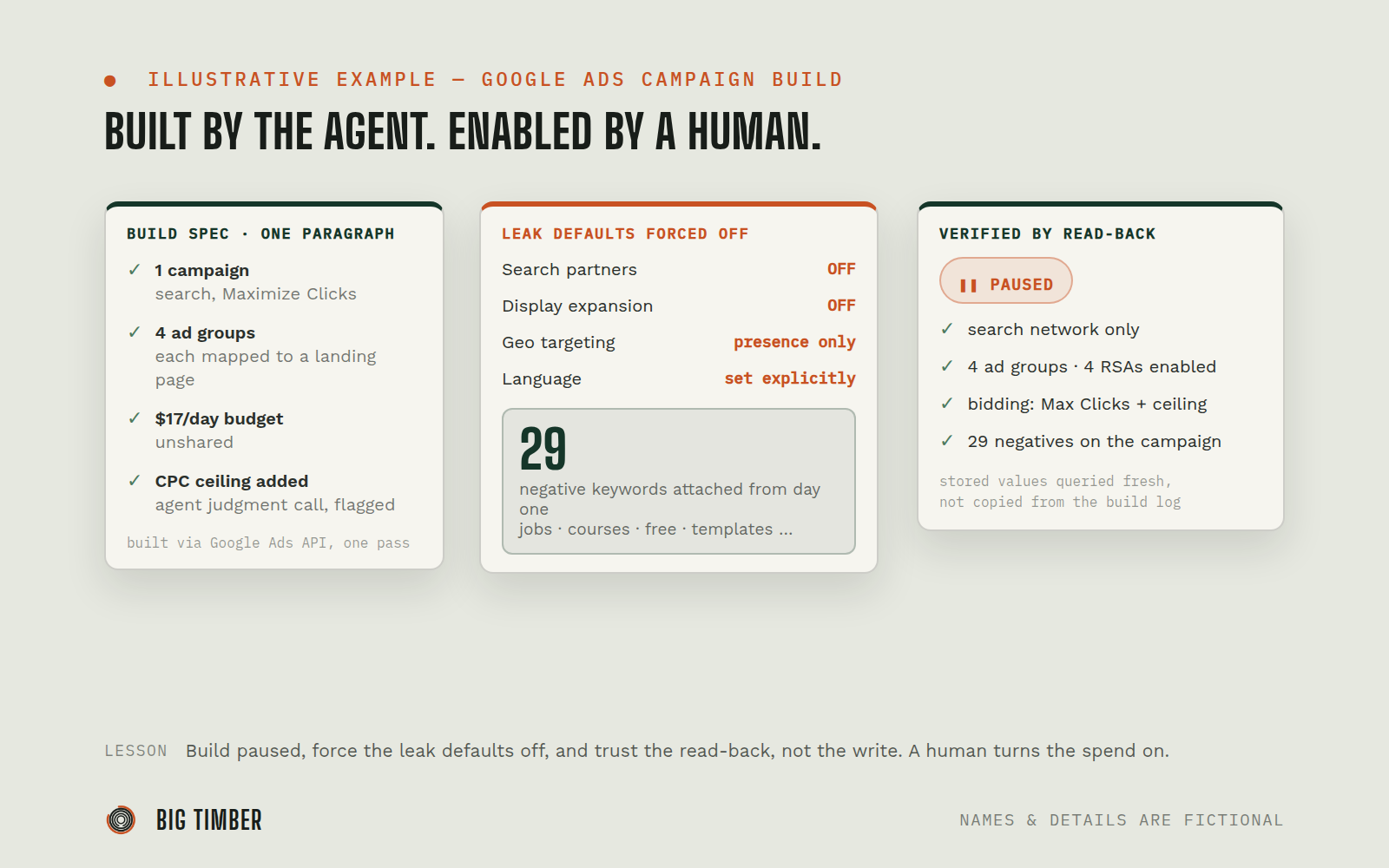
One campaign, four ad groups mapped to specific landing pages, a daily budget, and a bidding strategy. The agent turned that into a full API build plan and flagged its own judgment calls, like adding a max CPC ceiling to the Maximize Clicks strategy, to the human before writing anything.
- 02
Create the campaign with leak-prone defaults forced off.
Search network only, search partners off, display expansion off, presence-only location targeting for the market, language set explicitly, and an unshared daily budget so no other campaign can draw from it.
- 03
Build the structure in the same pass.
Four ad groups, each with its own keyword set and a responsive search ad pointing at the matching landing page, plus 29 broad-match negative keywords (jobs, courses, free, templates, and similar money-wasters) attached from day one instead of after the first wasted spend.
- 04
Ship everything paused.
The campaign was created in a paused state with enabled ad groups, keywords, and ads underneath, so a human decides when money starts moving, not the build script.
- 05
Verify by read-back, not by assumption.
A separate verification script queried the account afresh and confirmed every setting as stored: status, network settings, bidding strategy and ceiling, geo, language, negatives count, and the ad group to landing page mapping. The summary the human reviewed was built from that read-back, not from the build log.
Evidence from the workflow.
Each system has a role.
campaign, ad group, keyword, RSA, and negative keyword creation, plus the independent verification queries
Google Ads API
the build target, campaign created paused with an unshared budget
Google Ads account
each ad group mapped one to one against a specific service page
Landing pages
Why this is Coworker.
Takes assignments and reports back. You hand it work, it prepares and returns a result.
- 01
The agent builds paused and never enables spend; turning the campaign on is a human action. Judgment calls made during the build, like the CPC ceiling, were flagged to the human explicitly rather than buried. The verification step is read-only against the account.
Impact / Outcomes
A complete search campaign (1 campaign, 4 ad groups, keywords, 4 responsive search ads, 29 negatives) built in one pass instead of an hour in the interface wizard.
Every known budget-leak default confirmed off by read-back: search only, partners off, display off, presence-only geo. The verification summary showed stored values, not intended ones.
Zero launch risk during review: the campaign sat paused until a human chose to enable it.
The same build pattern is reusable across accounts, which is how it runs for both the agency's own campaigns and client accounts: the spec changes, the guardrails do not.
Find where a workflow like this fits.
Start with the systems, work, constraints, and authority already present in your operation.