AI Agent Context Limits: How an OpenClaw Agent in Slack Flags a Full Thread, Finishes the Job in Flight, and Resumes in a Fresh Thread From Saved State
Every AI agent has a ceiling on how much conversation it can hold at once. This one watches for the ceiling, says so before it hits, finishes the work already in motion, and leaves everything the next thread needs written down outside the chat. The next thread starts from that record, not from scrollback.
What was getting in the way.
An AI agent can only hold so much conversation at one time. A long working thread, with its file reads, screenshots, and tool output, fills that space faster than most people expect. When it fills without warning, the failure is ugly: the agent stalls mid-task, or keeps going while quietly losing track of earlier decisions, and the human finds out only when something comes back wrong. The usual workaround is worse than the problem. People start a new chat and spend twenty minutes re-explaining the project, or they paste in a summary and hope nothing important was left out.
Context
A team running a long-lived AI agent in Slack across many projects at once, where single working threads regularly run long enough to fill the agent's context. The rule did not come from a design document. It came from an administrator who was tired of finding stuck threads, and it took one short message to set. The pattern applies to any agent deployment that does real multi-step work: the limit is a fixed property of the technology, so the question is only whether it arrives as a surprise or as a planned handoff.
How the work runs.
- 01
Start from a rule a human wrote after real failures.
Early in the deployment, long threads grew past the model's hard limit and broke with a "prompt is too long" error. Each one sat stuck until someone noticed and reset it by hand. The administrator's instruction was short: there is no reason the agent should ever crash, so stop before the limit and say so, for every user. The same day, that became the first rule in the agent's standing instructions, saved to version control.
- 02
Watch the context budget as part of the work.
Under that rule the agent checks how much of its context it has used after heavy operations, with a warning threshold set well below the hard limit. Stopping early is the point, because an agent that hits the hard limit stops mid-sentence.
- 03
Say so before it becomes a problem.
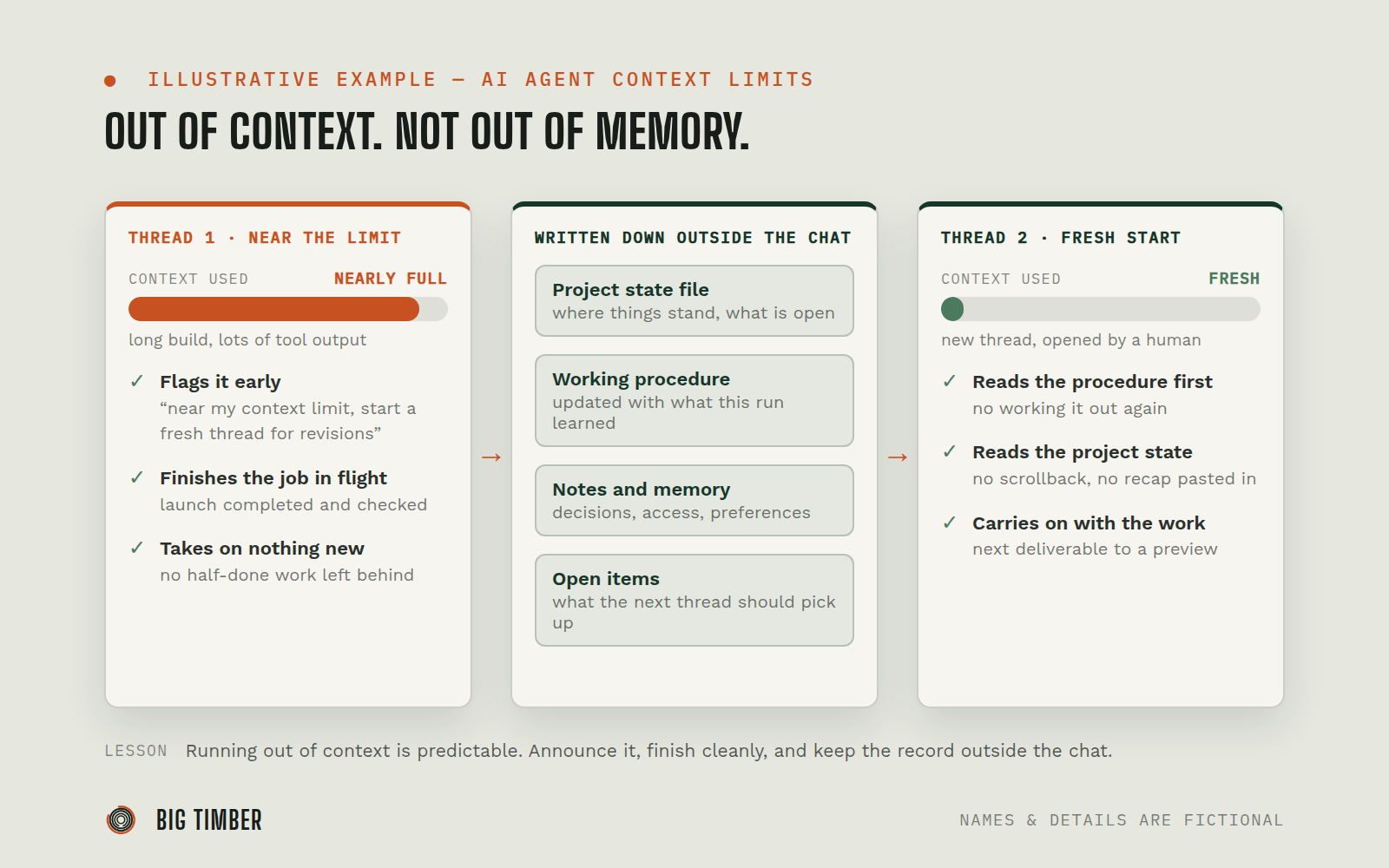
When a long build thread in Slack got close, the agent told the human in plain words, in the same message as its status update, that the session was near its limit and that further revisions should start in a fresh thread. It repeated the notice with the final report so it could not be missed.
- 04
Finish the job in flight, take on nothing new.
The launch already under way was completed and checked on desktop and mobile before the thread closed. The agent did not start new work it could not finish inside the remaining space.
- 05
Leave the record outside the chat.
Project state, client notes, and the step-by-step procedure for the task live in files, not in the conversation. At the close of the thread, the agent updated the written procedure with what it had learned during that run.
- 06
Resume in a fresh thread from the record.
The human opened a new thread with the next request. The agent's first moves there were to read the written procedure, the project state file, and its notes. It then carried the next deliverable through to a reviewable preview, without the earlier thread being pasted in or re-explained.
Evidence from the workflow.
Each system has a role.
where the work is requested and reported, one thread per working session
Slack
the agent runtime: per-thread sessions, context tracking, learned procedures, and searchable memory
OpenClaw
the durable record each thread reads at the start and writes back to at the end
Project state files
step-by-step instructions the agent updates after hard tasks so the next thread does not work them out again
Learned procedures (skills)
Why this is Operator.
Owns a workflow end to end, running the process inside the authority you set.
- 01
The limit behavior is a written rule set by an administrator, not something the agent decided for itself, and it applies to every user and every thread. It was written for reliability first. Cost is handled by its own rules: the agent warns and offers lighter options before any expensive operation, and a weekly check flags threads carrying a heavy context for a reset, since a long thread is re-read on every message and costs more per reply. The agent does not push past its limit to squeeze in one more task, and it does not open new work it cannot finish. The human decides when to start the fresh thread and what goes in it. State files and procedures are plain text the team can read and correct, so what carries over between threads is inspectable, not hidden inside a model.
Impact / Outcomes
The context limit was announced by the agent ahead of time, twice, instead of being discovered by the human as a stall or a wrong answer.
The work in motion when the limit approached was finished and verified before the thread closed. Nothing was left half-done.
The fresh thread picked up the same line of work from saved state. No recap was pasted in and nothing was re-explained.
What the first thread learned carried forward: the procedure it updated at close was the procedure the next thread read on its first step.
Find where a workflow like this fits.
Start with the systems, work, constraints, and authority already present in your operation.