Server-Side GTM Tagging Server Stood Up on a First-Party Subdomain From a Chat Thread
The browser is losing a fifth of the signal to blockers and short-cookie policies. Moving the tag off the browser is a build. The build happens in a chat thread.
What was getting in the way.
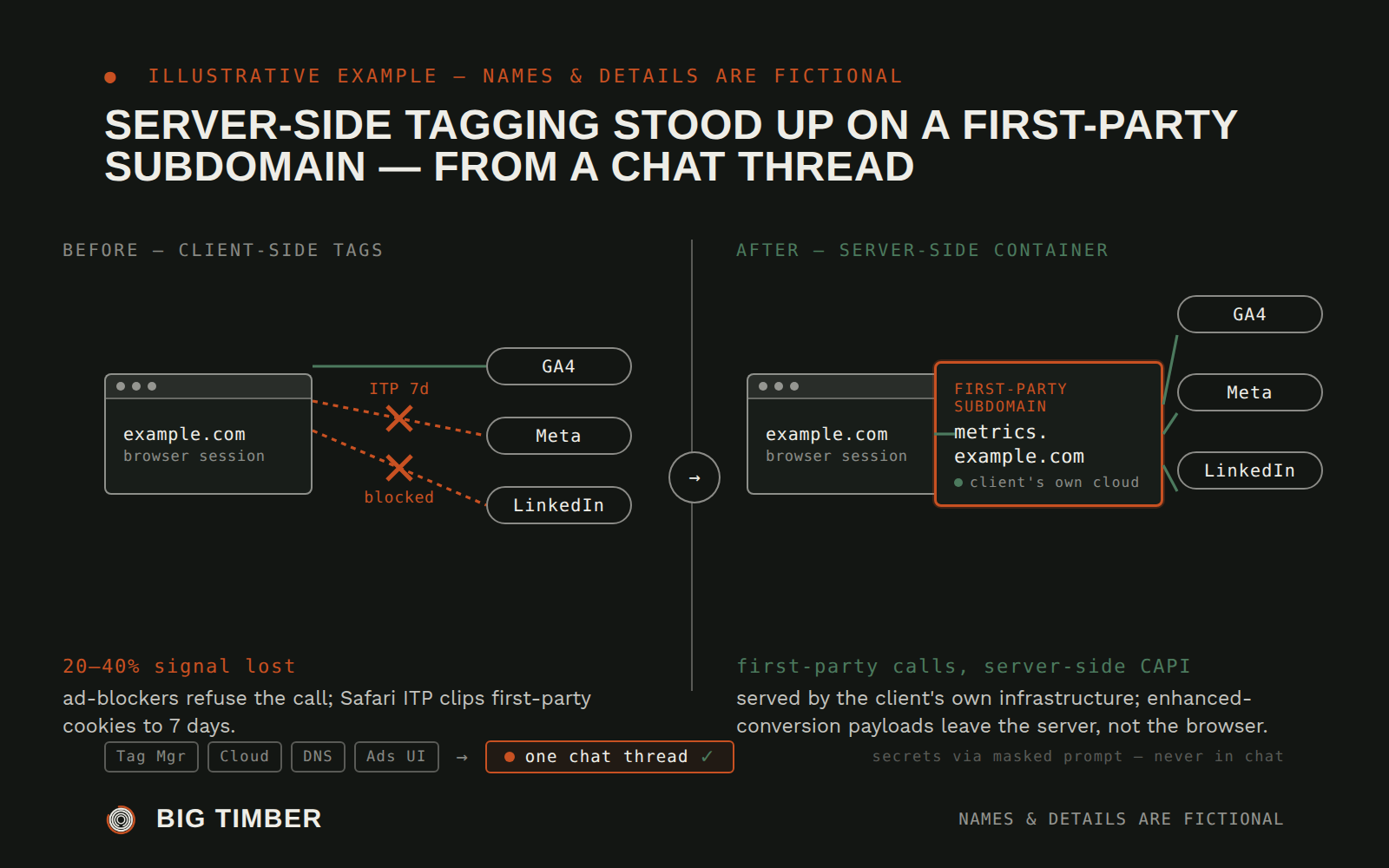
Client-side tagging — the browser calls Google, Meta, LinkedIn directly — is losing a growing share of the signal it's supposed to carry. iOS Intelligent Tracking Prevention caps first-party cookies at seven days, which quietly throws away returning-visitor identity. Ad-blockers refuse the pixel calls outright. Enhanced-conversion match rates sit well below what the first-party data could support, because the hashed email never leaves the user's browser. Everyone in the industry has agreed for two years that the fix is a server-side container on the client's own subdomain — and almost nobody deploys one, because the real work isn't the tag migration. It's the provisioning: a container host on a cloud project nobody's set up, a subdomain CNAME nobody's picked, a server-container config that mirrors the web container in ways the web-container author never had to think about, CAPI access tokens that have to be minted without landing in a log. Each step wants a different console tab and a different piece of institutional memory. The procedure, written down end to end, runs forty-plus commands across four surfaces. In practice it gets scheduled for next quarter and the browser keeps dropping signal.
Context
Universal — the pattern applies to any client whose paid-media surface has outgrown client-side tagging (lead-gen with meaningful returning-visitor behavior, e-commerce where Enhanced Conversions can meaningfully lift match rates, multi-domain funnels where first-party cookies are being clipped by browser policies).
How the work runs.
- 01
Two values, no console tour
The operator pastes the client's web container ID and the subdomain they want to use — one message with two values. The agent recognizes which cloud account the container points at, which registrar holds the domain, and which analytics properties are already live, and lists the specific accesses it still needs. The operator approves them individually, and the agent proceeds.
- 02
Server container on the client's own cloud
The agent stands up the server container on the client's cloud project — three small instances behind a load balancer by default, so an ad-click campaign doesn't take tagging down — and configures it with the server-container ID from Tag Manager. The agent does not have the client's cloud credentials; it generates a run script the operator pastes into the client's shell, and the script reports back enough state for the agent to continue without ever handling the credential itself.
- 03
First-party subdomain, verified against reality
The agent writes the exact CNAME record the registrar needs — subdomain, target hostname, TTL — and the operator applies it. The agent then polls the public DNS resolvers directly, every ten seconds, until the record propagates — not the registrar's own confirmation, which can be ahead of reality. The subdomain's TLS certificate is checked for a valid chain and matching Subject Alternative Name before anything is pointed at it.
- 04
Web container edited only after the server is reachable
The agent updates the web container's Google Tag and Google Ads tags to send to the new tagging subdomain, re-exports every event the client cares about — purchases, leads, qualified-call conversions — and sets up Enhanced Conversions for Leads to pass hashed email and phone server-side. Nothing is published to production until the preview environment reports the right events to the right destinations at the right counts, which the agent verifies by driving the preview itself.
- 05
Secrets never touch chat
CAPI tokens for the Meta and TikTok pixels, enhanced-conversion user data, any API key the server container needs — none of it is ever requested in chat, pasted into chat, or echoed back. The agent requests each secret by name through the operator's protected credential store, with a specific reason and an allow-list of hostnames it can be sent to; the operator enters the value once, into a masked prompt, and the agent references it by its stored handle for the rest of the deployment.
- 06
Verification runs against the live browser, not the preview
After the containers publish, the agent opens the client's real site in a browser session, drives a representative conversion flow — a form submit on the lead-gen page, a purchase on the shop — and inspects the actual network calls: the pixel requests leave the browser pointed at the first-party subdomain, the server container responds with event-received acknowledgments, Google Ads and GA4 debug views show the event with its enhanced-conversion payload, Meta's test-events console shows the CAPI event with its deduplication key. Any destination that reports a miss is traced to the specific tag and fixed in the same thread.
- 07
Runbook back to the client
The agent produces a short runbook the client's own operator can read — one page of what was provisioned, one page of the DNS record and the health check, one page of what to do if the tagging server starts erroring — and files the standing operating-posture facts (which subdomain, which CAPI tokens, which Enhanced Conversion fields, which GTM container versions) into the client's project memory so the next deployment job on the same account doesn't start from scratch.
Evidence from the workflow.
Each system has a role.
Record of truth
Tag Manager (web + server containers)
Action
Cloud container host
Action + signal
Domain registrar + DNS resolvers
Destination
Ad platforms (search + social) and analytics properties
Signal
Operator's masked-credential store
Record of truth
Project memory
Why this is Operator.
Owns a workflow end to end, running the process inside the authority you set.
- 01
The agent never requests, pastes, or echoes a credential or secret in chat; every CAPI token and API key is entered through the operator's masked prompt and referenced by handle. Cloud credentials belong to the client — the agent produces scripts the operator runs in the client's shell, so the deployment's root privileges never pass through the agent's hands. No published tag is called working until the live deployment confirms it — preview-environment success and debug-console success are intermediate checks, not shipping evidence. The runbook handed to the client is written at the level a human operator can execute without the agent in the loop, so the deployment is reversible and legible to the next team member.
Impact / Outcomes
A deployment pattern that typically takes a build week — four consoles, dozens of handoffs, a backlog item that keeps slipping — lands in a single chat thread the operator reads end to end, with every verification step done against the live subdomain before the thread closes.
Event delivery that was dropping a double-digit share to blockers and short cookies routes through the client's own first-party subdomain instead, which is served by the client's own infrastructure and seen by the browser as first-party.
Enhanced-conversion match rates lift from the client-side baseline to the server-side baseline — the hashed email leaves the server container, not the browser — on every form the deployment covers.
No CAPI token, API key, or user-identifying payload ever appears in the chat transcript — every secret is entered once through the masked-entry surface and lives only where its allow-list permits.
Find where a workflow like this fits.
Start with the systems, work, constraints, and authority already present in your operation.