Form Email Delivery Debug — check the receiver mailbox type before chasing sender identity
One screenshot cracked the case the DMARC rabbit hole couldn't.
What was getting in the way.
A website form reports success, the sender's own log says the email went out, and nothing arrives at the team inbox. The obvious suspects — DMARC, SPF, DKIM alignment, from-header mismatch — look like the problem because the symptom (a bounce that says "the email account that you tried to reach does not exist") reads exactly like a typo. A full afternoon disappears into DNS records and sender identity before anyone checks whether the inbox is a user mailbox at all.
Context
An e-commerce consulting firm wiring up form email notifications on a newly-rebuilt website. The inbox was a Google Group named after the public team address, with posting restricted to organization members — a configuration that is extremely common and completely invisible from the sender's side.
How the work runs.
- 01
Trigger
A form on a new or newly-wired site reports success but no email reaches the team inbox; the human asks the agent to debug.
- 02
Confirm the server-side send
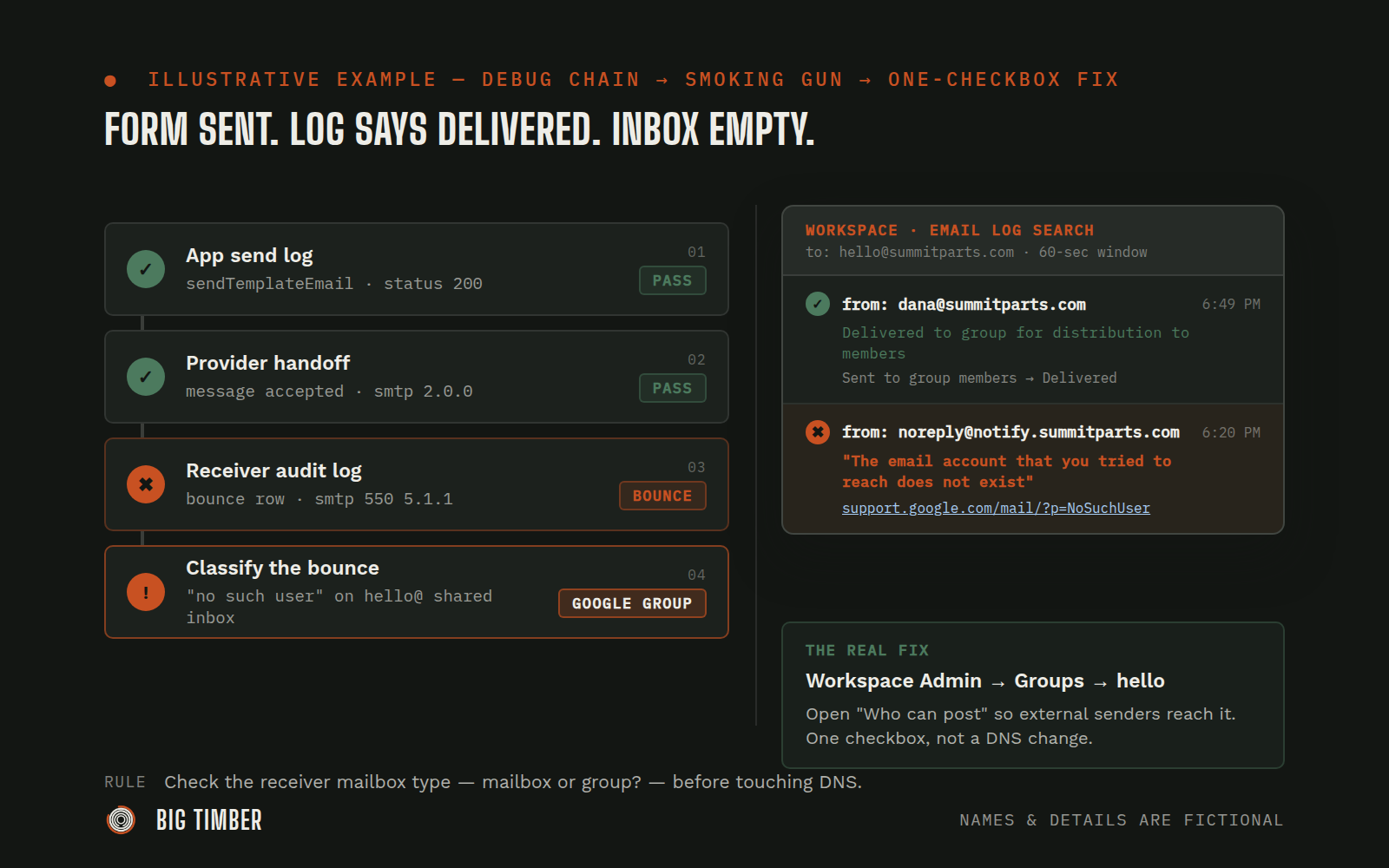
Agent reads the application's own email log and server-function log — did the send function even fire, and did the email provider accept the handoff? If no server-fn row exists, the form never submitted. If the log says "sent," the app did its job and the problem is downstream.
- 03
Pull the receiving mail provider's log
Agent walks the human to the receiver's email audit log (e.g., Google Workspace's Email Log Search), narrowed to the recipient address and a minute-wide window around the send. The log classifies every inbound into one of four outcomes — Delivered, Bounced, Quarantined, or no row at all.
- 04
Classify the failure before changing anything
On a bounce, the agent asks for the detail view. The SMTP response and any "no such user" link in the row are the crux. A "no such user" bounce on a shared-inbox name (hello@, support@, info@) is the fingerprint of a Google Group with restricted posting, not a typo.
- 05
Verify by comparing a known-good send
Agent asks the human to send a test from their own account to the same address and pull its log row next to the failed one. If the human's row shows "Delivered to group for distribution to members" and the application's row shows "no such user," the mailbox is a group and the application sender isn't allowed to post.
- 06
Fix at the receiver, not the sender
In Workspace Admin, the human opens the group's "Who can post" permission so external senders can reach it — either by widening the setting, by adding the application's noreply address as a member, or by allowing external posts with moderation.
- 07
Prove the fix with a fresh end-to-end submission
Agent submits a clearly-marked test through the live form, the human confirms the message landed in the shared inbox, and the lesson is logged in the deployment's state record for future wire-ups.
Evidence from the workflow.
Each system has a role.
Signal (origin of the send)
Website form (built on an AI website platform)
Signal (prove the app sent)
Application email log + server-function log
Signal (prove the handoff)
Email sending provider
Record of truth (what the receiver actually did)
Google Workspace Email Log Search
Action (the real fix)
Google Workspace Admin — Groups
Why this is Coworker.
Takes assignments and reports back. You hand it work, it prepares and returns a result.
- 01
The agent never changes the client's Google Workspace or DNS directly — it reads logs, classifies the failure, and hands the human a one-step fix with the evidence attached. Every test submission uses clearly-marked test data so the team can disregard it in the inbox.
Impact / Outcomes
A failure mode that looks like a DNS or sender-identity problem is cut to a one-setting receiver-side fix, in a single back-and-forth.
The debug chain becomes a standing playbook: application send log → provider handoff → receiver audit log → classify (Delivered / Bounced / Quarantined / no-such-user-via-group). Every future form wire-up uses it.
The deployment's state record gains a new standing check — "is the recipient a mailbox or a group?" — asked before touching DNS, which short-circuits the next occurrence on the next client.
Find where a workflow like this fits.
Start with the systems, work, constraints, and authority already present in your operation.